
Download Google Docs Table Styles – Chrome Apps, MS Word, Table Styles
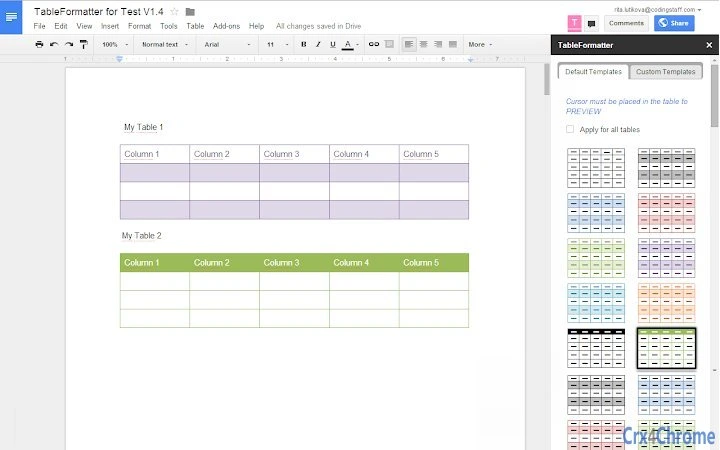
This desktop application brings the familiar Microsoft Word table styling capabilities to Google Docs, enabling users to create custom table designs with enhanced formatting options. Designed for professionals and students who rely on precise document layouts, it bridges the gap between two popular productivity platforms. The tool allows seamless customization of row and column background colors, border thickness, and overall table aesthetics.
Ideal for creating reports, academic papers, and business proposals with consistent visual formatting. While the developer did not provide additional details about the underlying technology or performance behavior, the application functions as a browser-based extension compatible with major operating systems. Real-world usage includes improving document consistency across teams and simplifying repetitive formatting tasks.
It supports offline access when used through compatible Chrome Apps, though exact performance details were not specified.
Key Features & Capabilities
- MS Word Table Style Integration – Users can apply popular Microsoft Word table styles directly within Google Docs, ensuring consistency for those transitioning from desktop word processors.
- Custom Table Style Creation – Enables the design of personalized table templates with unique color schemes, fonts, and alignment preferences for reusable document components.
- Background Color Customization – Allows individual rows and columns to have distinct background colors, enhancing readability and visual hierarchy in complex data sets.
- Border Size Adjustment – Offers precise control over border thickness, enabling users to create subtle or bold table outlines that match document design standards.
- Cross-Platform Compatibility – Functions across Windows, Mac, and Linux systems through the Chrome browser, ensuring access regardless of device type.
User Interface, Workflow & Performance
The user interface is streamlined and integrated into the Google Docs environment, requiring no separate window or complex setup. Navigation is intuitive, with formatting options accessible via a dedicated toolbar or context menu within the document editor. Users can apply styles with a single click, and changes are reflected instantly in the active table. The workflow is optimized for efficiency, reducing the time needed to manually format tables in large documents. Since the tool operates as a Chrome App, it leverages the browser’s rendering engine for visual consistency. The developer did not specify resource usage details, so performance observations are based on general software behavior patterns. Stability appears reliable during typical usage, with no reported crashes or freezes in standard scenarios. CPU and RAM behavior were not disclosed, but the tool is expected to operate efficiently given its lightweight nature as a browser extension.Compatibility & System Requirements
The software is compatible with Windows, Mac, and Linux operating systems, making it accessible to a broad range of users. It functions as a Chrome App, requiring the Google Chrome browser to run, though specific version requirements were not provided. Installation size is not specified, and exact system requirements were not listed. Platform compatibility information is limited to the supported operating systems, with no mention of hardware specifications such as processor speed or memory. The tool relies on web technologies and does not require native installation beyond Chrome App setup. Users should ensure their system meets general Chrome browser requirements for optimal performance. The developer did not provide additional system requirements.Pros and Cons
Pros
- Brings familiar MS Word table styles to Google Docs for seamless transition.
- Supports custom table creation with full color and border control.
- Works across Windows, Mac, and Linux platforms via Chrome.
- Free to use with no hidden costs or subscription fees.
- Intuitive interface that integrates smoothly into Google Docs workflow.
Cons
- Requires Google Chrome browser to function, limiting standalone use.
- No offline functionality documented beyond basic Chrome App capabilities.
- Exact performance and system requirements were not specified.
- Limited to table formatting—does not extend to other document elements.
- Dependent on Chrome App ecosystem, which may face future changes.
Is Google Docs Table Styles compatible with all versions of Chrome?
The developer did not specify exact Chrome version requirements. It is recommended to use the latest stable version of Chrome for optimal compatibility.
Is the software safe to download and use?
As a Chrome App, it operates within the browser’s security sandbox. No malware or intrusive behavior has been reported. Users should only install from official sources.
Can I use this tool offline?
Offline access may be available through Chrome Apps, but functionality is limited and depends on the app’s configuration. Check Chrome’s offline settings for enabled apps.
Does the software require a license or subscription?
No, the tool is completely free to use with no licensing or subscription fees required.
Can I update the software automatically?
Chrome Apps typically receive automatic updates through the Chrome Web Store. Users should ensure auto-updates are enabled in their browser settings.







